If a user has been assigned a corresponding role in the administration, they can carry out mass changes on elements. Mass changes are actions which change the properties of several elements at once, e.g. renaming several elements.
Mass changes always affect the number of elements which are, for example, selected in a search list or in Explorer.
Work steps
1.Open the desired elements in Explorer and select them.
2.Click the "Mass change" button in the ribbon > "Element & Folder"
3.The "Mass changes" tab opens
4.Click on the arrow in the "Action" column
5.Select the required mass change action, select or specify values, if required, and execute.
6.If necessary, activate the "Cancel in case of warning" checkbox. If this checkbox is active, the mass change is not executed if there is a warning, but is canceled with a warning instead.
7.If necessary, click the "Check" button.
8.Click the "Execute" button
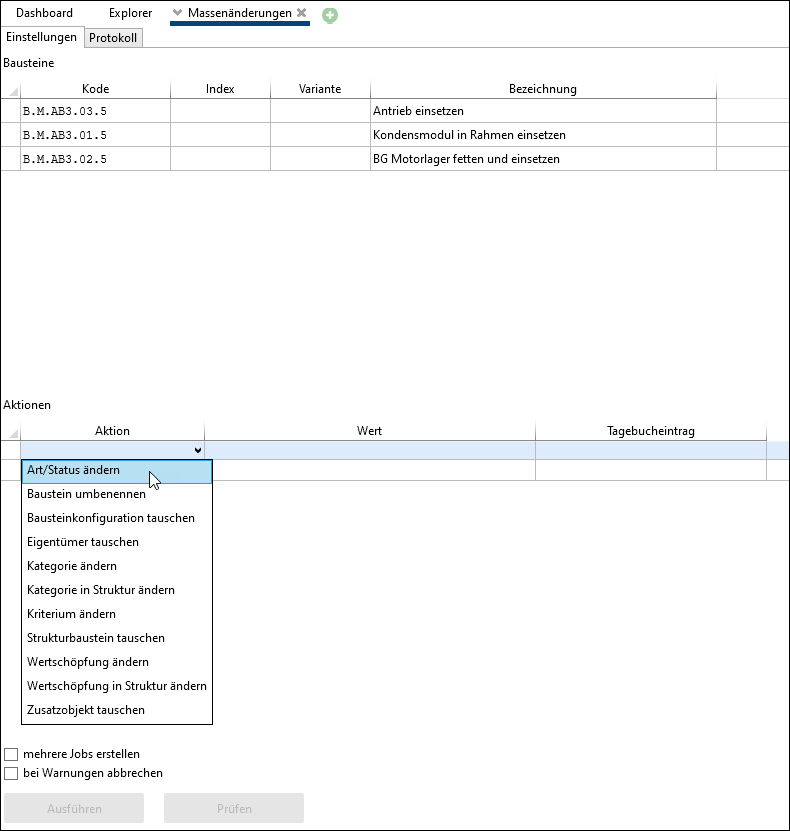
Mass changes tab, in which the required action is selected
Mass changes available at the moment:
•Bausteinkonfiguration tauschen
•Ablaufindikator ändern (e.g. value added, category)
•Ablaufindikator in Struktur ändern (e.g. value added, category)
•Schlagwörter ändern / Change tags in structure
•Change value added
Prior to execution, the potential changes of a mass change can be checked for possible violations of rules or rights. Every time a mass change is performed or checked, a log of the individual actions is displayed to the user. A reason for the change is saved for all mass changes, which is automatically entered in the journal of the processed element, making the changes traceable.