The standard tabs Header, Tabs and Criteria and Block Usage and Workplace Organization are available for block configuration.
A special feature is the EAWS®-Assembly tab.
More about this: |
|
|
|
|
|
|
|
|
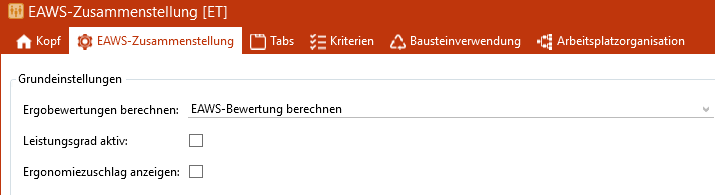
EAWS® assembly
The following options are available for the Calculate ergo ratings area: ▪Calculate EAWS® evaluation ▪Aggregate EAWS® evaluation (The EAWS evaluation is based on the underlying EAWS structures.) |

The calculation of the performance level can only be activated if the mode Calculate EAWS® evaluation has been selected. If a performance level is defined in the module configuration, the time adjusted in accordance with that performance level is used to calculate the EAWS® evaluation. |
If this function is activated, the ergonomic allowance time is displayed. |
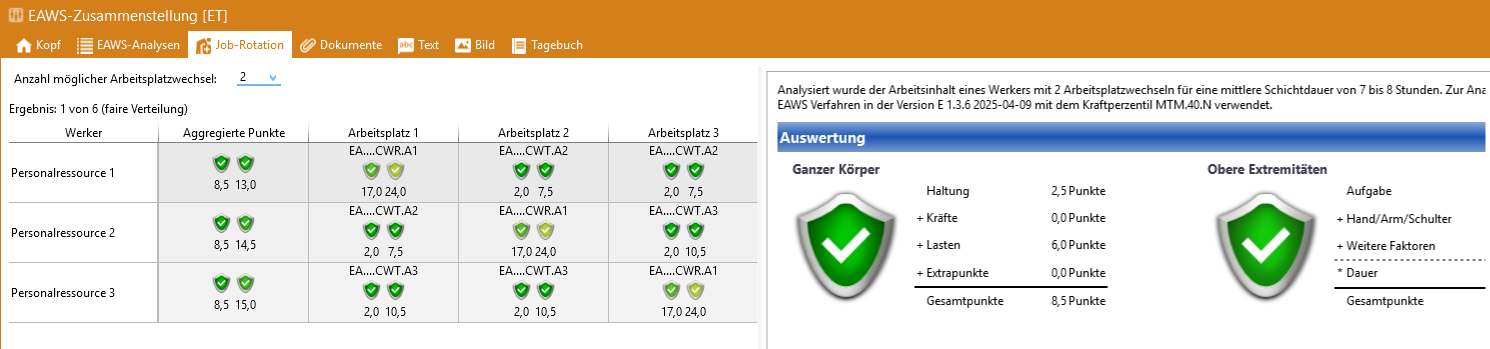
EAWS®-Compilation with the Job Rotation tab
If, in the basic setting Calculate ergo evaluation, the option EAWS® Aggregate evaluation is active, the tab Job rotation can also be activated in the Tabs tab. This makes it possible to assess the ergonomic strain of one or more workplace changes.