For the efficient analysis with MTM-1® Analyses, the Generate and Time-leveling wizard functions are available in the ribbon, if they have been activated at the element configuration in the Administration.
Wizards active means that the Generate and Time-leveling wizard functions must be used to place the brackets.
If the "Wizards active" function is not selected, the "Generate" and "Time-leveling" wizard functions are hidden. The placement of brackets is then carried out manually, directly in the structure in the "Code" column.
Example:
If the wizards are deactivated, direct entry with brackets is possible, e.g. M40B).
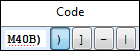
Manual selection of bracketing by clicking on the corresponding field or by entering the relevant bracket.