When designing new print components, it is advisable to base them on already existing ones. We recommend duplicating an existing print component and adjusting it to your requirements.
Here some notices about special functions:
chr$(13) inserts a linefeed. An alternative would be using ¶, for example "Description¶test". "Description¶test".
The function linefeed can be inserted via the tab text when 'edit table'.
str$(Number) converts a number to a character string. If data of a column/fields, which are transferred as numbers, should be mixed with data in string format, then this data has to be converted to strings, too.
For example, SIMO_CYCLES.End_descr + " ( "+str$(SIMO_CYCLES.End_No,0,0)+" )"
Output would be, for example: drilling ( 3 )
------------------------------------------------------------
Function |
Meaning |
Translate$ () |
Marks the text box as translatable |
DefaultLabel$() |
Field name from TiCon |
NullSafe() |
to ensure that no zero values are output |
FormatTime$ |
formats the times as specified during printing, provided that nothing has been fixed formatted |
Times are generally printed in TMU and 15 decimal places |
|
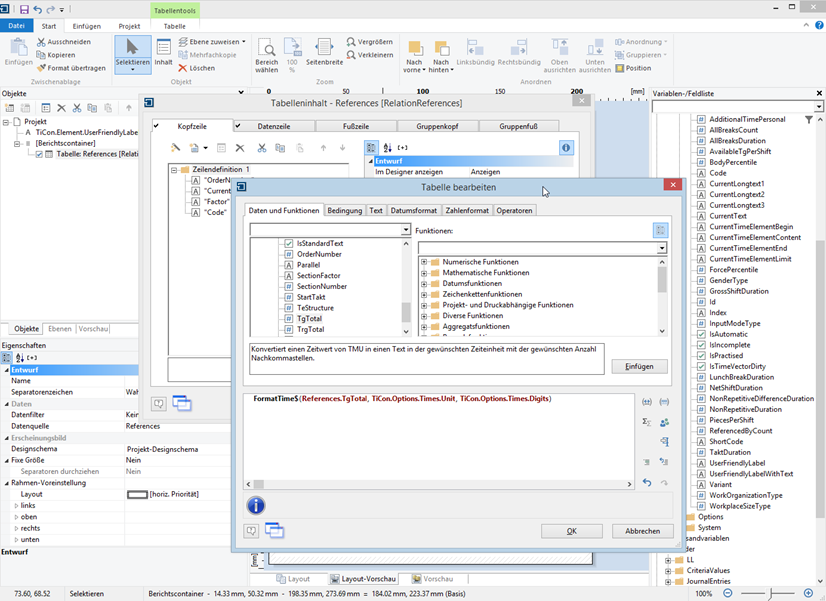
New function "FormatTimes$" to output times; times now always TMU
New function "DefaultLabel$" to output field labels