Elements can, for example, be opened from Explorer or from the Search.
Please note: |
Opening an element always opens it for editing. That is why an element can always be opened only once. |
There are different options to duplicate an element. To do so, select the corresponding element(s) and use one of the desired functions:
1) Double click
2) Press Enter
3) Clicking the plus sign on the right side of the last tab \ Open element - A dialog opens which can be used to select an element to be opened.
4) Drag and drop the element in the empty work area or in a work area where elements are already open to the tab bar next to the plus sign  or in front of or behind existing tabs.
5) Ribbon \ Open (element or usage)
6) Context menu \ Open (element or usage)
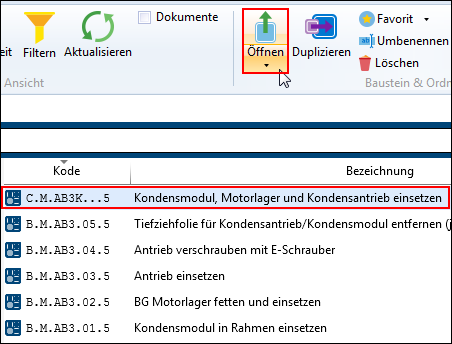
Open element using the ribbon

Selecting "Open" \ "Element" or "Usage"
Note: |
For the two options mentioned (ribbon or context menu), it is possible to choose between element and usage. Depending on the selection, the element is opened in the "Header" tab or in the "Usage" tab. |
Recently used elements can be directly opened from the Dashboard or by using the Application menu.