The "Admin function" tab was introduced with TiCon 4.06 in order to be able to map the SuperAdmin / LightAdmin authorization concept. Each admin function corresponds to a node in the administration tree view. This makes it possible to delegate individual admin activities (tasks) to individual users.
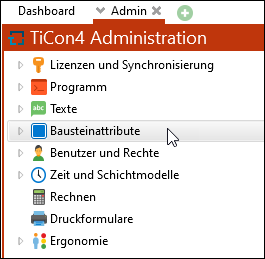
Administration tree view
Admin function |
Code |
Read |
Read/Write |
Administrator |
G.ADMIN |
To be able to use an admin function, the "G.ADMIN" right must be set to read or read/write. The set authorization is transferred to all underlying nodes, but can be adjusted individually by changing the authorization. |
|
Licenses |
G.ADM.LIC |
Show license overview |
Import licenses, activate etc. |
Program |
G.ADM.PRG |
View data on type and status, etc. |
Change all values. |
Texts |
G.ADM.TXT |
View data on autocorrect, spellcheck, etc. |
Change all values. |
Element attributes |
G.ADM.CFG |
View data on element configurations, process indicators, etc. |
Create or change element configurations, process indicators, etc. |
Users and Rights |
G.ADM.USR |
Read data |
Change data •Create, delete, change users + roles |
Time and shift models |
G.ADM.TIM |
Read data |
Change data as desired |
Calculate |
G.ADM.CLC |
Node is not displayed |
Mass time calculation can be performed |
Print forms |
G.ADM.PRN |
Print forms can be opened but not saved. |
Print forms can be changed and new print forms can be created. |
Ergonomics |
G.ADM.ERG |
Extra points can be viewed. |
Extra points can be created, changed, or deleted. |
Note: |
•If the "G.ADM.USR" right is active, please note that the user/role can give themselves or other users additional rights (including all administrator rights). •The "Standard" (not authorized) and "Locked" authorizations prevent access to the corresponding admin function. •A user is only a SuperAdmin if the effective right for G.ADMIN is set to "Read/Write". |