In the "Details" tab, coding and value sets are assigned for the necessary number of code positions. The user can only use predefined coding at the corresponding code position.
Note: |
The lines of the coding scheme are sorted according to the following scheme when they are saved. 1.Code component / Starts 2.Code component / Ends 3.Dependencies (without Dependencies first) As a result, there is no sorting of the rows according to the code or description columns. |
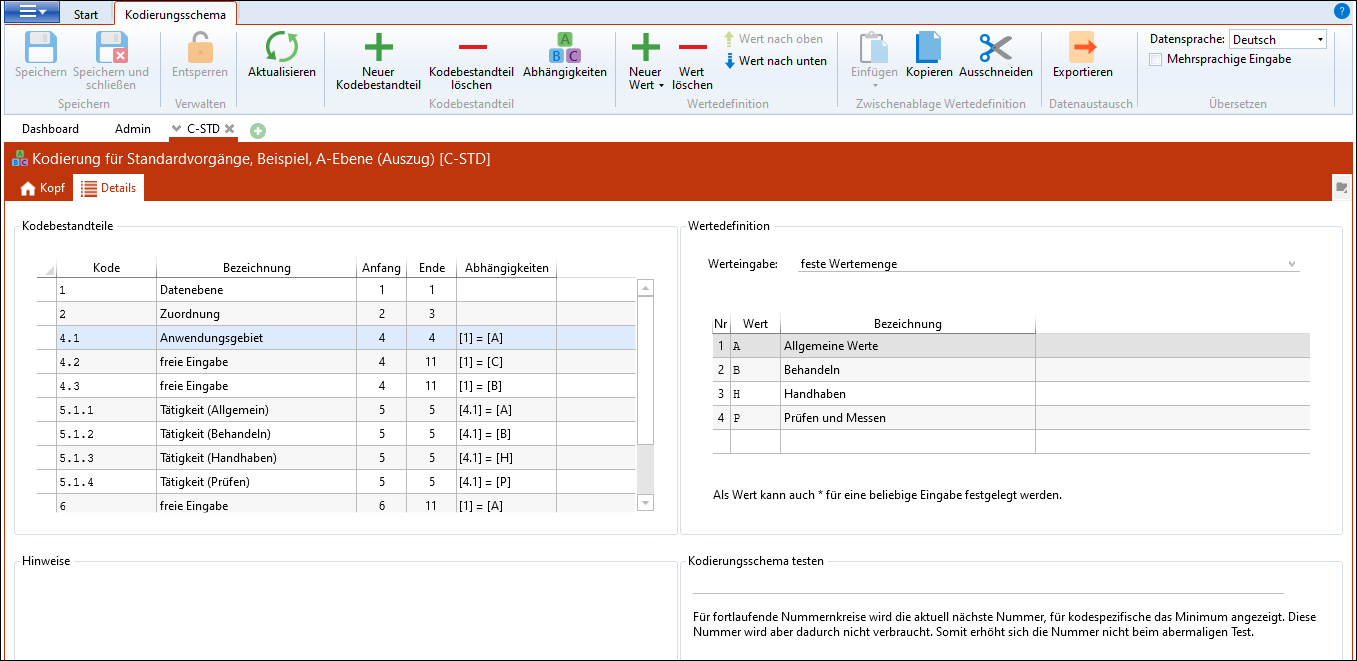
In the ribbon Coding schema, there are the following areas:
Description |
Meaning |
Code component |
|
New code component |
Inserts a new row in the code component. |
Delete code component |
Deletes the selected row from the code components. |
Dependencies |
Defines when the selected code component is permitted. |
Value definition |
|
New value |
Adds a new value to the value definition. |
Delete value |
Deletes the selected value from the value definition. |
Value up / down |
Moves the selected row(s) up or down. |
Procedure:
1.At first, a description is assigned to all code positions. To do that, the "Code" and "Description" columns are filled with values.
2.In the columns "Starts" and "Ends", the validity intervals of the code part are defined. If the validity limits are, for example, from 1 until 1, the definition is valid only for the 1st code position. If there the code areas overlap, these overlaps are highlighted by a red border. The user is responsible for avoiding any overlapping code areas.
3.After that, for each code position a value definition is determined.
For part codes additional dependencies can be stored (see: Dependencies).
In the area Test coding scheme section, the definition of the coding scheme can be tested using a sample code.