The balancing data can be refreshed using the "Refresh" button.
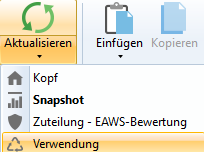
"Refresh" button with drop-down menu
In the drop-down menu that opens, you can select which area you want to refresh:
•Header
•Snapshot
•Assignment – EAWS evaluation
•Reference
If one or more elements within the balancing have been changed, the element in a balancing is NOT refreshed automatically, as a snapshot is saved in the database when a balancing is created. In this case, it is therefore necessary to select the "Refresh snapshot" option in order to transfer the new values of the changed element to the balancing.
Changes of this type are saved in the "Journal".