It is possible to automatically check the assignment Reach to grasp as well as Bring with case C before jointing. From TiCon 4.04 on, an extended check for possible simultaneity under consideration of the degree of practice has been implemented.
There are different levels of checks, depending on the setting in Administration.

Settings in the administration for the MTM-1® element configuration
Level of check |
Note |
Save |
Check not possible |
Notice only in status bar, no Check button available |
Saving possible |
Manual check active |
Notice only in status bar, Check button available |
Saving possible |
Check active, prevent saving in case of an error |
Notice in status bar, request to check and correct the structure when attempt is made to save |
Saving is canceled |
Check active, prevent saving in case of a warning* |
Notice in status bar, request to check and correct the structure when attempt is made to save |
Saving is canceled |
*) Warnings are currently not implemented.
A corresponding notice is already displayed in the status bar during entry, which highlights errors in the structure.
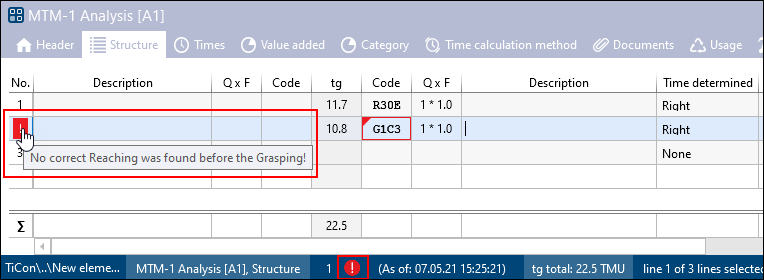
Example for notice to check in the status bar
The manual check is started via the  button in the ribbon.
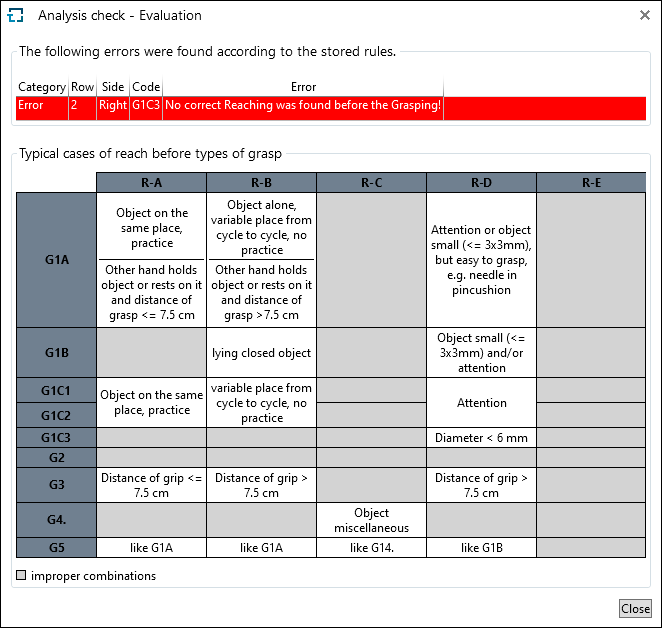
Error overview with default rules