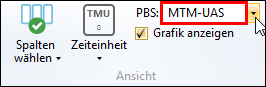
The MTM process elements are divided into element systems (formerly: analysis method). This simplifies analyses. When the desired element system is selected (e.g. UAS®, MEK®), the short code of an element (e.g. "AA1") can be entered into the structure of an analysis instead of the complete code (e.g. "3000AA1....5" or "3000AA1....6").
 Which element systems are available?
•MTM-1® •MTM-2® •MTM-SD® •MTM-UAS® •MTM-MEK® •MTM-OS (MTM Office System) •MTM-VI (MTM Visual Inspection) |
Usually, the following element systems are used:
•MTM-SD® (Standard Data)
•MTM-UAS® (Universal Analysis System for Series Production)
•MTM-MEK® (MTM for Single and Small Batch Production)
•MTM-OS (MTM Office System)
How to select an element system?
The element system is defined in the ribbon in the "View" group. The following drop-down list is used for this purpose:
Define process element system Depending on the settings, short codes (e.g. "AA1" instead of "3000AA1....5" for UAS®) can also be entered. The element system set is part of the individual settings of every user. It is automatically loaded when the same user logs in again.
|