In the "Times" tab (only MTM analyses, MTM-1® analyses, and MTM-2® analyses), the time types visible in the time classification are configured.
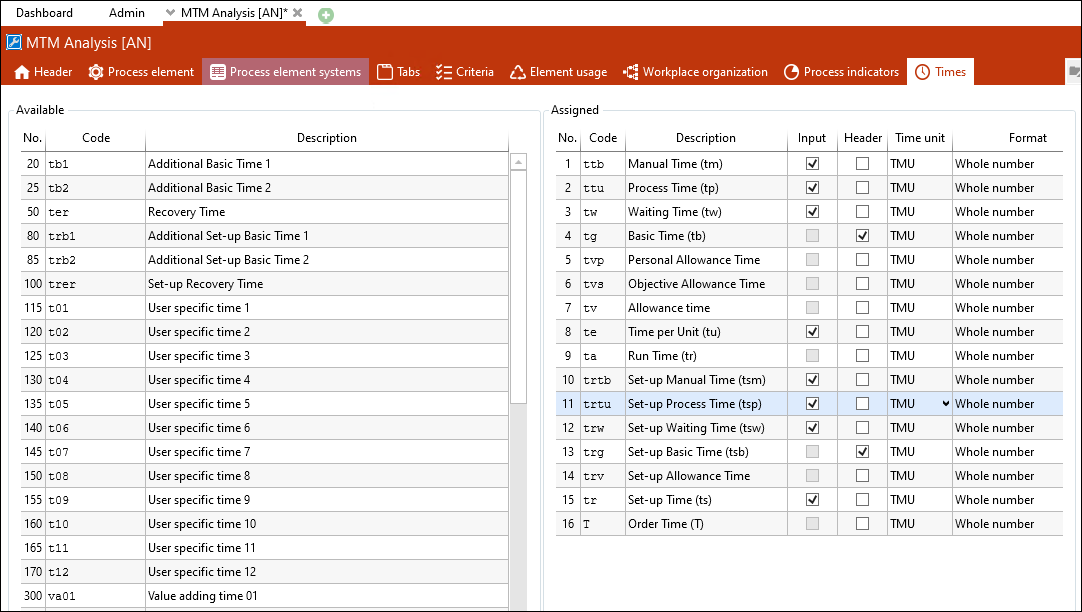
The "Times" tab of the "MTM analysis" [AN] element configuration
You can add times by using the Insertbutton in the Element configuration ribbon.
For a time displayed in the Times tab you can set the following:
•Input field (Input)
•Header (Display in Header tab).
•Time unit
•Format
The order of the times can be changed by using the arrows in the ribbon or by using drag & drop.
Input
If the checkbox is active, a time can be entered for the selected time type. The checkbox can only be enabled for the time types ttb, ttu, tw, te, trtb, trtu, trw, tr, and user-specific times.
Header
If the check box is activated, the selected time type in the Header tab is displayed.
Sets the unit for the selected time type.
Setting |
Meaning |
none |
No time unit is displayed and the time type does not respond to the switching of time unit and decimal places in the ribbon. |
[Time unit] |
Initially, the selected time unit / decimal places are displayed. By clicking the time unit, it is possible to adjust or change the time unit / decimal place for this view. |
current |
Always displays the decimal places and time unit, which have been selected in the ribbon. |
Format
Sets the number of decimal places for the selected time type.
Note: |
If user-specific times are filled with calculated values in allowance classes, the entry for this user-specific time cannot be used simultaneously in the "Times" tab of the element configuration that uses this allowance class. Saving this constellation is not possible and will be rejected with an error. |