In the Workplace organization tab the general conditions of a project (monitored task or standard task) are displayed and can be edited.
The input in this tab is only taken from the administration settings, when a new element is created. Subsequent changes in the administration do not affect existing elements.
Please note: |
•In the administration, it is possible to define several settings at the element configuration in the Workplace organization tab. •The "Workplace organization" tab does not necessarily have to be active. If the "Workplace organization" tab is not active, the default values in the administration must be defined, as otherwise EAWS® evaluation is not possible. |
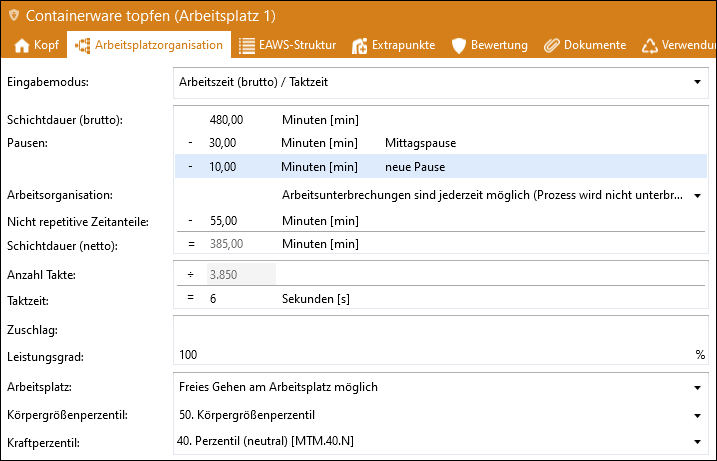
"Workplace organization" tab of an EAWS® analysis
You can select one of the various input modes to enter the data. Select which data you would like to specify and which data TiCon should calculate automatically. It does not matter which input mode is used to calculate the values for the EAWS® evaluation.
The following possible entries are available:
Input mode |
Calculation of |
Number of cycles/Working time (net) |
Cycle time, working time (gross) |
Number of cycles/Working time (gross) |
Cycle time, working time (net) |
Number of cycles/cycle time |
Working time (net), Working time (gross) |
Working time (net) / cycle time |
Number of cycles, working time (gross) |
Working time (gross) / cycle time |
Number of cycles, working time (net) |
Definitions:
Number of cycles = Total quantity
Shift duration (net) = working time (net) = working time of an operator per shift without break time (pure working time)
Shift duration (gross) = working time (gross) = attendance time of an operator per shift, i.e. effective working time incl. non-repetitive parts and all breaks
In addition, the contents of the following fields also play a corresponding role for the EAWS® evaluation and are included in the evaluation as follows:
Field |
Evaluated in ... |
|
Breaks / Work organization |
Section 4 |
Upper limbs |
Working time (net) (Shift duration (net)) |
Section 1, 2, 3 and 4 |
Body postures, forces and loads, and upper limbs |
Cycle time |
Section 1, 2, 3 and 4 |
Body postures, forces and loads, and upper limbs |
Workplace |
Section 1 |
Body postures, forces and loads, and upper limbs |
Height percentile |
Only displayed for information, not evaluated |
- |
Gender |
Section 2 and 3 |
Forces and loads |
Please note: |
It is possible to maintain a list for breaks in the administration. However, you can also add or delete breaks directly in the workplace organization of the relevant element in the ribbon or via the context menu, if changes are allowed. Only breaks with a minimum duration of 8 minutes are relevant for evaluation. |
In addition to the input modes mentioned above, there are three other input options in the balancing and the characteristic that some of the options are not displayed if at least one variant is available.
Input mode |
Calculation of |
Number of cycles |
Working time (net), cycle time (flexible*) |
Working time (net) / cycle time(1) |
Number of cycles |
Working time (gross) / cycle time(1) |
Number of cycles |
Working time (net)(1) |
Number of cycles, Cycle time (flexible*) |
Working time (gross)(1) |
Number of cycles, Cycle time (flexible*) |
(1) Inactive, if at least 1 variant is available.
* The highest volume of work or the most efficient worker gives the cycle time.