Cycle time factors for human resources and machines
A cycle time factor is used if a human resource or a machine is available several times within a station.
A factor can be assigned to a human resource / machine in the corresponding column. See also: How do I assign a factor?
In the case of cross-station operators, the factor is kept synchronized between all operator instances.
The factor is the same for all product variants. It is therefore NOT possible to use different factors for each product variant!
 Effects of a cycle time factor (hereinafter "n") on the assignment
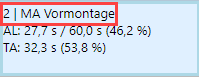
Effect on the cycle time of the human resource / machine: Calculation: Cycle time of resource * n This changes the load for the human resource / machine and the station to which they are assigned. Change in display: The factor used is shown in front of the relevant human resource / machine in the assignment graphic. Example: The pre-assembly employee was assigned a factor of 2.
Display of a station factor in the assignment graphic Assigned elements and posture transitions are displayed with time / n so that the resource is displayed accurately with the changed cycle time. Effects on ergonomics: The EAWS evaluation is carried out with a modified cycle time and number of cycles Calculation: Cycle time (regular) * n = cycle time (new) Number of cycles (regular) / n = number of cycles (new)
Example: There is one station (S1) with one operator (worker) (W1) and one element (B1). The element has a tg of 10 TMU The operator has a cycle time factor of 2 The element has an element factor of 4 tg total = 10 TMU * 4 = 40 TMU Cycle time = Tcycle * 2
|