Parallel processes are indicated by lowercase and capital letters. To establish the time of the element, the total time of rows of the same letter are compared, whereby all rows with lowercase letters are compared to those with the same letter with capital letters. In each case, the respective lesser portion of time will not be considered for further calculation. Rows that have no parallel indicator are always considered for the calculation of the element time.
Rules:
▪Parallel indicators can have one or two letters.
▪Only letters are permitted, e.g. aa, ab, AA, AB
▪Special characters must not be used
▪Upper and lower case letters must not be used simultaneously.
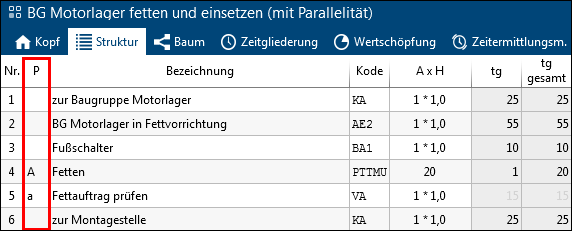
Example: During the greasing process, the grease layer is checked. Checking the grease layer (15 TMU) takes less time than greasing (20 TMU). The grease layer check is therefore being ignored.
Note: |
The usage of the "Parallelism" function ("P" column) is assigned in the administration for each element configuration (process element). This function is deactivated upon delivery. Starting with TiCon 4.06, sections and parallel indicators may also be used in an element at the same time. |
Using sections and parallelism simultaneously
The simultaneous use of sections and parallelism allows cases to be mapped where several sections run in parallel.
Parallel indicators can be set both for section rows (rows marked in dark gray) and for rows within a section (rows marked in white and light gray).