In the Structure tab, you can use the context menu or ribbon to choose from already linked documents such as pictures, PDF files... It is also possible to link new documents to the individual structure lines.
If it is a picture, this is displayed in the document column as a preview. The following symbol is displayed for all other document types:  .
.
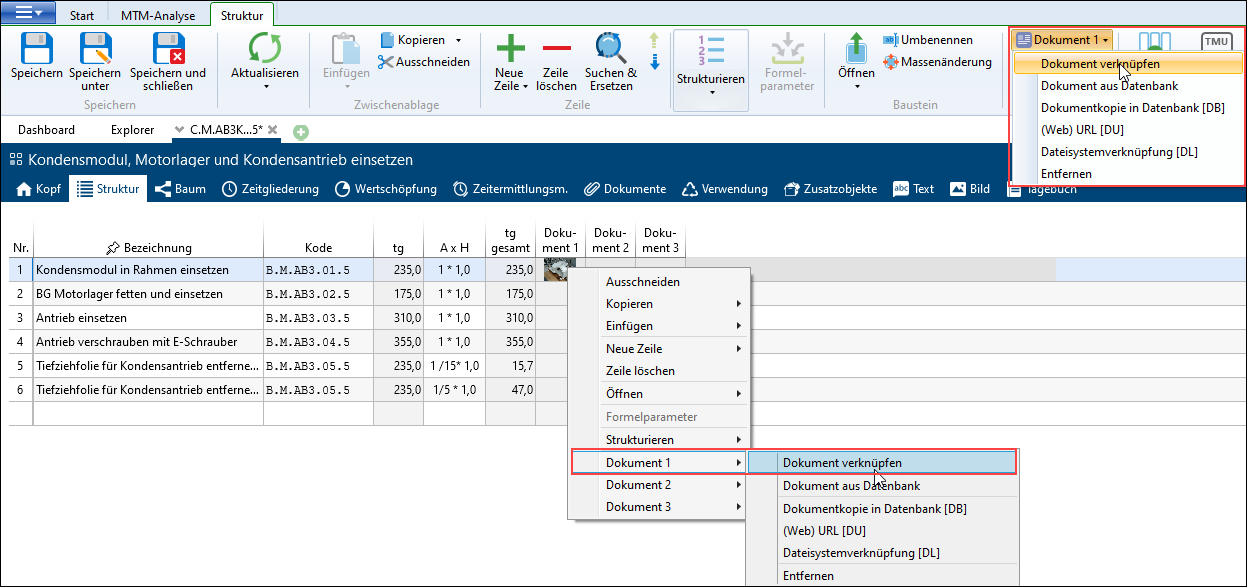
Link document in the Structure tab using the context menu or drop-down list in the Document area in the Structure ribbon
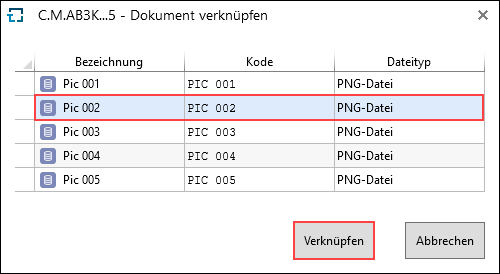
Selection of possible documents, which are already included in the Documents tab of the analysis
Function |
Definition |
|---|---|
Link document |
Links already existing documents. |
Document from database |
Opens dialog for selecting a document. |
Document element configurations like e.g. |
All document element configurations that are permitted in the open element configuration and the corresponding folder are listed here and made available for selection. |
•Document copy in database [DB] |
When copying to the database, take into account that the status of the document is saved. Changes outside TiCon are therefore not taken into account. Copying also influences the size of the database. |
•(Web) URL [DU] |
Here, a reference to an Internet or intranet site with an individual description can be saved with an element. |
•File system link [DL] |
A link refers to the current file in the file system. Linking does not influence the size of the database. |
Remove |
Removes the document from the selected document column. |
Please note: |
The Document area in the Structure ribbon is only visible if at least one document column is active. |